Local Hosting Using IGOR
GEM
The GEM interface should always be used to start iGOR. The necessary patches should be enabled via the GEM interface:
1. Open up GEM and select the appropriate 60fps patch for the mod being hosted. Also select the Track Gap Freeze Fix Patch:

2. Press the "IGOR" button:

iGOR
1. On the main IGOR window, press the "Host" button on the toolbar:

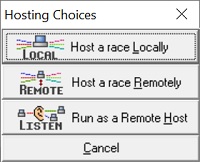
2. The "Hosting Choices " popup menu will appear. Press the "Local" button:
3. The main window pops up at the "Host" tab. Enter appropriate comments in the "Host comments", "Connection type" and "Server location" fields. Select the following options:
Note: Please ensure the "Full-Screen" option is NOT selected as it can cause server problems.

4. In the "Network/Server" tab, override the core.ini settings. For a FTTP (Fibre To The Premises) or
FTTC (Fibre To The Cabinet) broadband connection the server should be able to provide a stable connection with
the following bandwidth settings. Pre and Post race scripts are available here
and can be used by saving them in the scripts folder in the iGOR installation (default location is C:\GPLSecrets\iGOR\scripts).
The default port for iGOR is 32766. In order to use a different port, the tick box should be checked and the desired port
number entered into the text box. Unfortunately the standard distribution of iGOR (Release 1.6) does not support
different ports. However there is a patched version available here that does support
different ports.

5. In the "Security" tab select the following options and enter the appropriate passwords.

6. For races with restrictions on chassis use (e.g. 2 litre 66 mods cars only) it is usefull to restrict the chassis the drivers may select when they join. Sometimes the full name of the car will not be visible when hosting a race. As a guide the following screen shots show the full car names as they appear to the drivers when joining the server.


7. Finally in the "Event List" tab select the track, practice time and event type. For a single race the "Repeat event list" should be set to 1.

8. Once the passwords have been inputted the "Host" button will become active and the server can be started.
Notes:
- After having inputted all the data, the settings can be saved in a .ihs file. This file can then be loaded and modified as necessary in order to start other races. An example file for UKGPL__4 is here.
- If it is necessary to shut down the server manually you will need to join the race with the BOSS password. Join as you would normally as a driver but type the driver's password then a slash and then the BOSS password. For example if the driver's password is john and the BOSS password is surtees then you would type john/surtees. Once you have joined the race type !shutdown in chat to halt the server.
- Don't shut the server down manually under normal circumstances. You must let the server shut down automatically to ensure the race results and replay are saved correctly.
|